
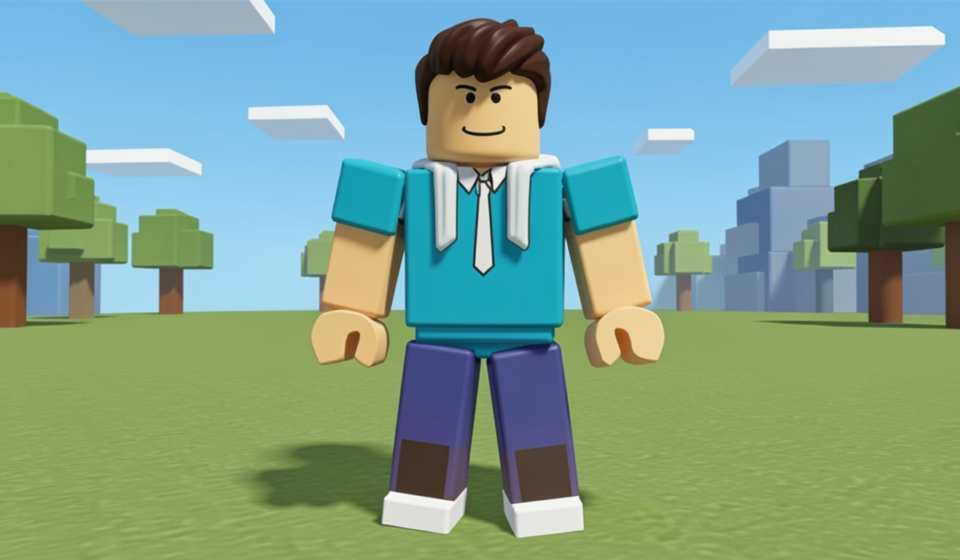

Have you ever wondered why some players look so cool the moment they join a game? It is all because they know how to style their roblox avatar the right way. Your character is more than just a digital person on a screen. It is a way to show your friends who you are and what you like. Whether you want to look like a brave knight, a funny robot, or a trendy teenager, the options are endless. In this guide, we will walk through everything you need to know to make your character look amazing.
Creating a great roblox avatar does not have to be hard or expensive. Even if you do not have many Robux, you can still find awesome free items in the shop. I remember when I first started playing, I spent hours trying on different hats just to see what looked best. That is the fun part about this game! You get to be the boss of your own style. Let’s dive into the details and turn your basic character into something truly special that everyone will notice.
Table of Contents
The Basics of Roblox Customization
| Feature | Details |
| Character Name | Roblox Avatar (Default or Custom) |
| Main Categories | Clothing, Body, Animations, Accessories |
| Body Types | R6 (Classic) and R15 (Modern) |
| Currency Used | Robux (Some items are Free) |
| Storage | Avatar Editor / Inventory |
| Platform | PC, Mobile, Xbox, and VR |
What Exactly is a Roblox Avatar?
Before we start building, we should talk about what a roblox avatar actually is. This is your virtual body that moves around in every experience you visit. When you first sign up, you get a simple character, but you can change almost everything about it. You can change the height, the skin color, and even the way your character walks. It is like having a digital closet full of clothes that you can switch whenever you feel like it.
I think the best part about a roblox avatar is that it never has to stay the same. One day you might want to explore a spooky mystery game as a ghost. The next day, you might want to race cars while looking like a professional driver. Because there are millions of items made by other players, you will never run out of new things to try. It is all about having fun and being creative with your digital self.
Choosing Between R6 and R15 Styles
When you go to edit your roblox avatar, you will see two main choices for your body style. These are called R6 and R15. R6 is the classic look that has been around for a long time. It only has six moving parts, which makes it look like an old-school toy. Many people like this style because it feels nostalgic and works well in “obby” games. It is simple, blocky, and very easy for the computer to move around.
On the other hand, the R15 roblox avatar is much more modern. It has fifteen moving parts, which means your elbows and knees can actually bend! This makes your movements look much smoother and more realistic. If you love wearing high-quality 3D clothes or using cool emotes, R15 is usually the best choice. I personally prefer R15 because it allows for much better animations when I am dancing or running away from monsters in a game.
How to Find Free Items in the Shop
You do not need to spend real money to have a cool roblox avatar. The Avatar Shop has a special filter that lets you see only the free items. You can find shirts, pants, hair, and even faces without spending a single cent. Many events and brands also give away limited-time items for free if you complete small tasks. This is a great way to build up your inventory and have plenty of options for your daily outfits.
When I am looking for new gear for my roblox avatar, I always check the “Price: Low to High” setting first. You would be surprised at how many neat hats and jackets are hidden there. Sometimes, Roblox releases official bundles that come with a whole outfit and a body shape. If you are new, grabbing these bundles is the fastest way to stop looking like a “noob” and start looking like a pro player.
Using Layered Clothing for a Realistic Look
One of the newest features for your roblox avatar is something called Layered Clothing. In the past, clothes were just flat pictures painted onto your character’s skin. Now, you can put on jackets, sweaters, and dresses that actually sit on top of your body. This makes your character look 3D and very detailed. You can even mix and match different layers, like putting a denim jacket over a hoodie for a very stylish vibe.
The cool thing about Layered Clothing is that it stretches to fit any roblox avatar shape. It doesn’t matter if your character is tall, short, or wide; the clothes will adjust automatically. This was a huge update for the community because it meant we could finally wear baggy clothes or puffy coats. I suggest trying out a few different combinations in the editor to see how they look when your character moves around.
Picking the Perfect Hair and Face
Your character’s head is the first thing people see, so make sure your roblox avatar has a great face. There are hundreds of expressions to choose from. Some faces look happy, some look serious, and some even look like they are winning! If you want to be extra fancy, you can use “Dynamic Heads.” These are special faces that can actually blink and move their mouths when you talk through your microphone in certain games.
Hair is another big part of your roblox avatar style. You can find short hair, long hair, and even hair that glows in the dark. Some players like to “stack” hair, which means wearing two or more hair items at the same time to make it look thicker. While this costs more Robux, it creates a very unique look that is popular in roleplay games. Always pick a hair color that matches your favorite outfit to keep everything looking neat.
Adding Accessories to Stand Out
Accessories are like the sprinkles on top of an ice cream sundae for your roblox avatar. These are items like wings, swords, pets that sit on your shoulder, and sparkling effects. You can wear up to ten different accessories at once, but be careful not to overdo it! If you add too many things, your character might look a bit messy. It is usually best to pick one or two “statement” items that really show off your personality.
I love adding a small pet to my roblox avatar whenever I play. It feels like I have a little friend coming along for the adventure. You can also find back items like capes or backpacks. If you are playing a fantasy game, a glowing sword on your back looks amazing. If you are just hanging out with friends, a pair of trendy sunglasses can make you look very relaxed and cool.
Saving Your Favorite Outfits
Did you know you can save different versions of your roblox avatar? This feature is called “Outfits” or “Costumes.” It allows you to save a specific look so you can switch back to it later with just one click. This is very helpful if you have a favorite holiday outfit or a special suit for competitive games. You won’t have to manually find every single piece of clothing every time you want to change your style.
I have about ten different saved looks for my roblox avatar. I have one for winter with a warm coat, one for the beach, and even a silly one where I look like a giant banana! To save an outfit, just go to the Avatar Editor, click on the “Outfits” tab, and hit “Create New Outfit.” Give it a funny name so you remember what it is for. This keeps your digital closet organized and ready for any game.
The Importance of Animation Packages
Animations change the way your roblox avatar walks, runs, jumps, and sits. Without an animation package, your character will use the standard movement, which can look a bit stiff. There are many packages you can buy, such as the “Mage” walk, the “Ninja” run, or the “Toy” idle. These animations add a lot of personality and make you look like you really belong in the world you are exploring.
When you equip a new animation, every movement your roblox avatar makes becomes more interesting. The Ninja package makes you look fast and sneaky, while the Superhero package makes you look strong and brave. I highly recommend saving up some Robux for an animation package if you want to level up your look. It is one of those small changes that makes a huge difference in how other players see you.
Staying Safe and Following Rules
When you are designing your roblox avatar, it is important to remember the rules. Roblox has “Community Standards” that make sure everyone stays safe and has a good time. This means you should not try to wear clothes that have mean words or inappropriate pictures on them. If you follow the rules, you can keep playing without any problems. The moderators check new items every day to keep the shop clean for everyone.
Sometimes, people try to make “invisible” or “glitched” versions of a roblox avatar. While this might seem funny, it can sometimes get your account in trouble if it breaks the game rules. It is always better to be creative within the guidelines. There are so many legal ways to look cool that you don’t need to use cheats. Stick to the awesome items in the shop, and you will be a respected member of the community.
Conclusion: Express Yourself!
In the end, your roblox avatar is all about having fun. There is no right or wrong way to dress up. Some people like to look like themselves in real life, while others want to look like creatures from a different planet. The best part of the game is that you can change your mind whenever you want. So, go ahead and explore the shop, try on some free items, and show the world your amazing style!
I hope this guide helped you understand how to make the most of your character. Remember to save your favorite outfits and keep an eye out for free event items. Your roblox avatar is your ticket to millions of adventures, so make sure you look your best while you play. See you in the game, and have a blast being whoever you want to be!
Frequently Asked Questions
1. How do I change my skin color?
To change the skin color of your roblox avatar, go to the Avatar Editor and click on the “Body” tab. Select “Skin Tone” and pick any color from the palette. You can even use the “Advanced” button to give your arms and legs different colors!
2. Can I get Robux for free?
Roblox does not usually give away Robux for free. You should be careful of websites that promise free Robux, as they are often scams. The safest way to get them is by buying them or creating your own clothes and items to sell in the shop.
3. Why won’t some clothes fit my character?
If you are using an older character type, some new Layered Clothing might look a bit strange. Try switching your roblox avatar to the R15 body type. This usually fixes the problem and makes the 3D clothes look much better.
4. How many accessories can I wear at once?
Currently, your roblox avatar can wear up to 10 accessories. This includes things like hats, hair, face items, neck items, and back items. Just remember that you cannot wear too many of the same type (like three hats) without special settings.
5. What is a “Noob” outfit?
A “Noob” is a term for a player who uses the default skin and clothes. Usually, this is a blue shirt and green pants. While some people use it as a joke, many players love the classic Noob look for their roblox avatar because it is iconic!
6. Can I make my own clothes?
Yes! If you have a subscription or a bit of Robux, you can design your own shirts and pants. You can then upload them so your roblox avatar can wear them. If other people like them, they might even buy them from you!